VAP
Turn the cameras you already have into a safety system — the video never leaves your site.
A forklift nearly hits someone and nobody finds out until the next one connects. VAP turns the cameras already on your wall into reviewable near-miss events: detection runs on an NVIDIA GPU edge box inside your building, and only metadata, a short evidence clip and the operator's decision ever leave it. Every alarm is confirmed or dismissed by a person.
Start for €2,900: three weeks on your own cameras, then three months running live on your floor — included. After that, you decide. Excl. VAT · one site · up to 6 cameras · a limited number of PoC slots each quarter.
VAP
Features
Runs on the cameras you already own
Existing RTSP cameras on your own network — no rip-and-replace and no proprietary camera to standardise on. One condition rather than a footnote: the camera must offer a second, lower-resolution stream, because detection runs on that and the main stream is copied untouched into the evidence clip. ONVIF is useful for finding cameras, not a requirement.
Zero inbound ports; the video stays on site
Detection and tracking run on an edge box inside the building. What reaches the EU-hosted management plane — or your own, if you self-host it — is metadata, a short evidence clip and the operator's decision, never the continuous stream. The footage itself stays inside your building.
No faces, no identity, no scoring
The event contract has no field for a face, an emotion, an identity or a productivity score, and it will not be given one. That is an architectural boundary, not a setting an administrator can quietly change — which is what makes the works-council conversation about safety rather than surveillance.
A person confirms every alarm
No rule fires on a single frame; each needs temporal confirmation first. Then an operator confirms or dismisses, and the audit trail records camera, zone, time, clip, model version and decision — which is the record an insurer or an inspector actually asks for.
Works when the internet doesn't
A durable offline queue buffers events on the edge and retries until the link returns. The buffer has a documented ceiling, and if it is ever reached the box reports the gap rather than hiding it.
Compliance paperwork, drafted from your system
The DPIA & Compliance Starter Pack: adaptable drafts of your DPIA, workplace signage, employee notice, processing agreements and AI Act technical documentation, drawn from live system facts rather than from a template. Your DPO adapts and signs them; we supply the facts. A licence gate in CI fails the build on AGPL, GPL, SSPL and non-commercial dependencies, and every release carries an SBOM.
Who it's for
Built for the floor, not the boardroom.
Sites where vehicles and people share space, and where one collision costs more in damage, downtime, sick leave and premiums than the cameras did.
Warehouses & 3PL
Forklift-versus-pedestrian conflict is the incident that ends shifts and careers. VAP watches the aisles and dock approaches where it happens.
Manufacturing with internal transport
Plants moving material between halls get restricted zones, after-hours presence and blocked-route rules on the cameras already covering those routes.
EHS & safety leads
For the person who has to show an inspector or an insurer which controls are in place — and produce camera, zone, time, clip and decision afterwards.
- Measured inference ceiling on one Quadro RTX 6000, 2 August 2026
- 174.9 /sMeasured inference ceiling on one Quadro RTX 6000, 2 August 2026
- Cameras per recommended box in the subscription, sized so the box never runs at its limit
- 12Cameras per recommended box in the subscription, sized so the box never runs at its limit
- From the decision to the alarm in your inbox, over a 24-hour window
- p95 1.5 sFrom the decision to the alarm in your inbox, over a 24-hour window
- Compliance documents generated from the live state of your system
- 17Compliance documents generated from the live state of your system
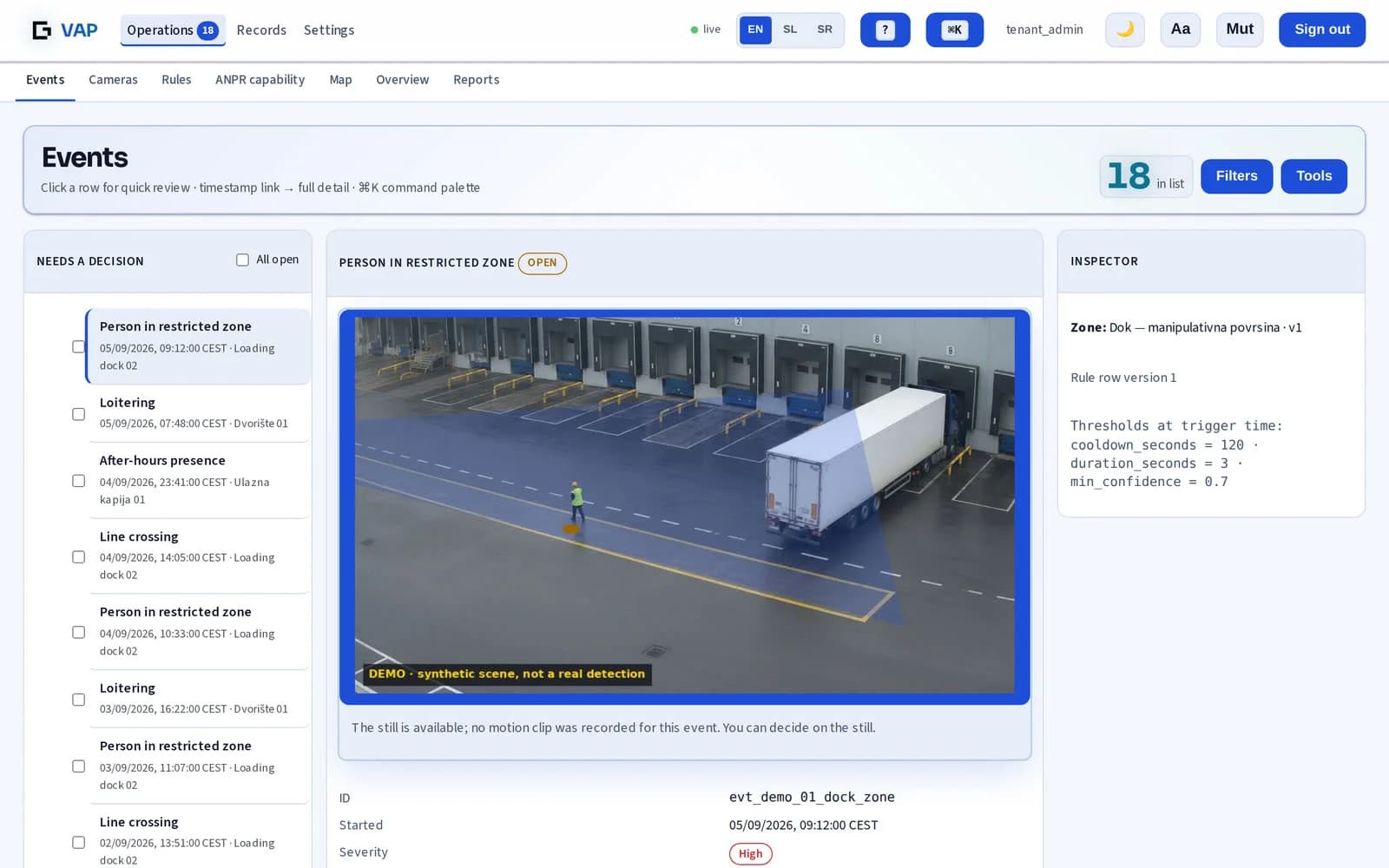
What the operator sees
An event, and everything needed to judge it.
The zone that was broken, the rule version, the thresholds in force at the moment it triggered, and the decision — kept so it can be defended months later.
Integration
Safety events, delivered to Milestone XProtect®
VAP sends each event to your XProtect Event Server as an Analytics Event, with the detected object's bounding box and, for zone rules, the zone polygon — so XProtect can raise it as an alarm in its Alarm Manager. The server on your site posts it over your own LAN; nothing is installed on the XProtect servers.
Tested end to end on XProtect Express+ 2026 R1: the alarm arrives with the camera, the zone and the object box drawn in the alarm preview. Measured September 2026.
How it differs
The same cameras, a different bargain.
Every row below is a design decision with a cost attached, not a feature comparison we won by choosing the categories.
| Typical cloud video analytics | VAP |
|---|---|
| Continuous video is streamed off site to the provider's cloud. | Video never leaves the building. Events, a short evidence clip and the operator's decision are all that travel. |
| An internet outage leaves a gap in the record, usually a silent one. | A durable queue on the edge buffers events and retries until the link returns. The buffer has a published ceiling, and reaching it is reported rather than hidden. |
| Face identification and worker scoring are often available as options — and that is where the legal risk starts. | Neither exists, and neither can be switched on. The event contract has no field for an identity, a face or a score. |
| Where the data rests depends on the provider, and is often outside the EU. | An EU centre, or your own infrastructure if you self-host it. |
| The bill grows with minutes of video, retention and cameras. | It grows with the cameras under analytics, and nothing else. |
| What the auditor gets is a marketing PDF about the vendor's compliance. | A pack generated from the live system — your cameras, your zones, your retention, your model versions. |
Typical cloud video analytics
Continuous video is streamed off site to the provider's cloud.
VAP
Video never leaves the building. Events, a short evidence clip and the operator's decision are all that travel.
Typical cloud video analytics
An internet outage leaves a gap in the record, usually a silent one.
VAP
A durable queue on the edge buffers events and retries until the link returns. The buffer has a published ceiling, and reaching it is reported rather than hidden.
Typical cloud video analytics
Face identification and worker scoring are often available as options — and that is where the legal risk starts.
VAP
Neither exists, and neither can be switched on. The event contract has no field for an identity, a face or a score.
Typical cloud video analytics
Where the data rests depends on the provider, and is often outside the EU.
VAP
An EU centre, or your own infrastructure if you self-host it.
Typical cloud video analytics
The bill grows with minutes of video, retention and cameras.
VAP
It grows with the cameras under analytics, and nothing else.
Typical cloud video analytics
What the auditor gets is a marketing PDF about the vendor's compliance.
VAP
A pack generated from the live system — your cameras, your zones, your retention, your model versions.
AI Act
Where VAP sits under the AI Act.
A site that tells you to classify first should say what it concluded about its own system, and where that conclusion could be challenged.
Working assumption: outside high-risk
Annex III §4 covers systems used for employment and worker management. VAP is not built to evaluate or monitor individual performance — its rules fire on space, not on people: a zone, a line, a dwell time, a vehicle where a person is. Each deployment still gets its own legal confirmation rather than inheriting this one.
Where the line sits, and what holds it
If a deployer used the output to discipline individuals, that use could pull the system into scope. So the permitted-use terms forbid it, the product produces no per-person report, and the statistics it does produce are aggregated without identity. The boundary is contractual and architectural, not a promise about intentions.
Built to the high-risk duties anyway
Technical documentation of architecture, model versions, dataset provenance and accuracy; logs kept at least six months; human-in-the-loop review on every alarm; a running risk-management process. The system is designed to meet the substance of the high-risk obligations even though we conclude it sits outside them — so a reclassification would be a paperwork exercise, not a rebuild.
The dates we work to
The Digital Omnibus (Regulation (EU) 2026/1744, in force 27 July 2026) moved stand-alone Annex III high-risk duties to 2 December 2027. Article 50 transparency stayed at 2 August 2026, and the Article 5 prohibitions — none of which VAP touches — have applied since February 2025.
Measured, not claimed
Numbers with a method, a date and a command behind them.
Every figure below was measured on named hardware and is repeatable with a command, so your own engineer can reproduce each one on your box.
174.9 inferences per second, one GPU
10.9–12.5 ms per inference, measured on the Quadro RTX 6000 in our lab — roughly 24 cameras on that card at the frame rate these rules need. The box we recommend for your site is sized from this figure with a wide margin: 12 cameras per box in the subscription. The number is a measured ceiling on a specific card, not a projection — and the same benchmark runs on your hardware in about ten minutes before anyone signs anything.
Why the GPU is a requirement, not a recommendation
On CPU alone, four cameras fall to 5.8 inferences per second in total with a 95th percentile of 1.07 seconds. That is why an NVIDIA card on site is in the requirements — the sizing is arithmetic you can check, not a preference.
The rescale cost is ours to carry, not yours
Frame rescaling used to run on the CPU and cost five times what it should. The alternative to fixing it was a tuning guide asking every customer to reconfigure every camera. It was fixed in the product, so the capacity above is what you get without touching your cameras.
17 draft compliance documents, pre-filled from your system
The paperwork a deployment actually needs — the Article 26(7) works-council notice before go-live, the Article 26(9) DPIA, the ROPA entry, retention proof — generated from the live state of your system rather than from a template. Your DPO adapts and signs them; the facts are ours to supply.
534 decoders that never ran, removed
The shipped build carried 534 ffmpeg decoders our pipeline never executes, and every one of them turned up in customer scanner reports. Now zero decoders and zero encoders, with 358 demuxers and 182 muxers kept — measured over RTSP, with negative controls, and enforced by a gate on the delivery path. Code that ships and never runs is still attack surface.
Model updates wait for your maintenance window
New detector versions are never pushed to a customer box automatically. A safety product fails silently — a broken detector does not raise an error, it stops reporting, which looks exactly like a quiet day — so an update lands when you are watching, not when we release.
Alarm load
How many alarms will your operator actually get?
If there are too many, they stop looking — and that is a settings problem, not a people problem. The standard your safety officer already knows puts numbers on it, so we measure against those instead of against our own opinion.
Up to 6 an hour is workable
The level at which an operator can still assess each alarm rather than clear it. This is the target a tuned site is aimed at.
12 an hour is the ceiling
Above this the queue is being processed rather than read, and the value of the review step starts to fall away.
Past 30 an hour it is not working
At that rate the system is no longer doing its job, whatever its detection quality. We measure the rate on your site and name the three rules making the noise.
What you get
What your report shows, month after month.
The value is not a promised number. It is that the number exists, is measured on your own cameras, and lands on your desk every month.
False alarms, per zone
The share of alerts your operators dismissed, for every camera and rule. Where it sits above target, the report names the reason and what we change. We tune toward below 5% — a target, not a contractual guarantee.
Close calls, where they happen
Confirmed person–vehicle close calls per zone, so the next corrective action goes where the risk actually is.
Operator load
Alarms per operator per hour against EEMUA 191, with the rules making the noise named.
Uptime, with every outage
Measured availability with every outage and its cause, and how long it took the responsible person to hear about it.
Every event accounted for
How many events were recorded, and the cause of any gap in the chain.
A decision in writing
At the end of the PoC: the report, a GO / NO-GO / extend record, and the compliance drafts ready for your counsel.
Sample
See the report a PoC ends with, before the PoC starts.
Three weeks end in a document and a decision, not in a demo. This is that document.
The sample below is the full PoC report and handover record: the success criteria agreed in week one, the numbers before and after tuning, what we changed and why, what the operators decided on 412 alarms, the draft compliance documents handed to your counsel, the open issues with an owner and a date, and the week-three GO or NO-GO signed by both sides. The site, the company and every figure in it are invented and every page says so — read it for the structure and the level of detail, not for results to expect on your floor. Yours carries your numbers, and we never publish it.
Download the sample PoC reportPDF · 89 KB · invented data, three pages
How to start
Onboarding first, then a subscription per camera under analytics.
Every site starts with onboarding: zones, rules and thresholds are tuned against your floor, so the subscription starts on a system that already works for you.
Onboarding
€2,900
Three weeks on up to six of your own cameras, and the first three months of operation. Remote install, zones and rules drawn on your floor plan, tuning, and a written handover. At the end of month three you either take a subscription or stop, with nothing further owed.
Excl. VAT · one site · up to 6 cameras · a limited number of PoC slots each quarter
Team
€249
per month
Covers 6 of your cameras, €35 a month for each one beyond
One site, for a warehouse EHS or operations team.
Site
€449
per month
Covers 12 of your cameras, €30 a month for each one beyond
A mid-market single site, or an integrator's end customer.
Business
€799
per month
Covers 24 of your cameras, €18 a month for each one beyond
Up to three sites under one tenant, with a named contact.
The package grows with you. A camera beyond the package is €35 a month on Team and €30 on Site, so the moment you reach the size of the next package, that package is the cheaper one — at 12 cameras, and again at 24. One recommended box runs up to 12 cameras, and the number of boxes is always in your quote.
The same on every tier
- Event retention 30 days by default, up to 90 days at no extra charge
- The DPIA & Compliance Starter Pack — draft documents, regenerated as your system changes
- Email and signed-webhook alerting
- Operator console in English, Slovene and Serbian
TechRevati provides technical functionality and draft documentation to support compliance. TechRevati does not provide legal advice and does not guarantee the regulatory compliance of the processing carried out by the customer. Final responsibility for the lawfulness of the video surveillance and for the accuracy of the assessments lies solely with the controller.
Rather own it? VAP also comes with a one-time, permanent licence and runs on your own hardware — on site or in your data centre. Same software, no monthly fee, and support and updates come with a yearly Care plan. We check what your server can handle in 10 minutes and send you a quote — just ask.
Prices exclude VAT. Annual prepayment is 10% less. Hardware is yours or your integrator's — we neither sell nor lend the box, and the margin on it stays with the channel. No cameras or hardware are included in the subscription — VAP runs on the cameras you already have.
VAP or Prova?
VAP works with the cameras you already have — any brand with an RTSP stream — and runs detection on a GPU box on site or on your own server. Prova runs inside the Axis camera itself, with no box at all. The cameras you have decide which one fits.
See ProvaWill it run on the cameras you already have?
Five questions, two minutes — a straight answer, the price for a site your size, and the sample document for the product that fits.
Request early access to VAP.
Tell us about your site and what you need to be able to prove. We reply within one business day, and you will be talking to the engineers rather than a sales desk.
VAP
Tech stack
- NVIDIA / ONNX Runtime
- Python 3.13
- FastAPI
- PostgreSQL
- Redis
- MinIO
FAQ
Frequently asked questions
Does our video go to a cloud?
No. Detection and tracking run on an edge box on your own network, with zero inbound ports open to it. What leaves the site is metadata, a short evidence clip and the operator's decision. There is no arrangement in which the continuous camera stream is shipped to us or to a third-party platform.
Is this facial recognition, or is it scoring our staff?
Neither, and not as a matter of policy. The event contract that every part of the system is built around has no field for a face, an identity, an emotion or a productivity score. Adding one would mean changing the shared data contract and every component that reads it, which is why the boundary was put there rather than in a settings page.
Does VAP stop the forklift or warn the driver?
Neither, and that is a design decision rather than a limitation we are working around. On-vehicle warning systems need hardware on every truck, a retrofit per vehicle and driver acceptance before they do anything, and they leave nothing behind afterwards. VAP works from the cameras already on your wall, covers the crossings no truck-mounted sensor sees, and closes the loop instead: the clip, the zone, the time, the model version, the operator who confirmed it and the corrective action you can close out. The two combine well — one warns in the moment, the other makes sure it does not repeat.
How many false alarms will my operators see?
As many as your zones are tuned for, which is what the onboarding weeks are for. We will not quote you an accuracy percentage: a figure without the dataset and the threshold behind it is a brochure number, and anyone quoting 99% without naming either is quoting one. What we do instead is measure the alarm rate on your site against the industry standard for alarm load and tell you which rules are producing the noise.
Which cameras work, and can it run without a GPU?
Existing fixed RTSP cameras, provided each offers a second lower-resolution stream — detection runs on that, while the main stream is copied untouched into the evidence clip. A camera that pans invalidates every zone drawn on it, so PTZ is only usable if it stays put. Cloud-only cameras that expose no local stream cannot work at all. A GPU is not optional: on CPU alone four cameras collapse to under six inferences per second in total, which is why an NVIDIA card on site is a requirement rather than a recommendation.
How do we start?
With three weeks on your own cameras, so the decision is made on your floor and your numbers. We install remotely, draw the zones and rules on your plan with you, tune them against what your site actually does, and hand over a written record of what was set and why. At the end you decide whether it stays. We take on a limited number of sites at a time.
Have a project in mind?
Tell us what you want to build. We respond within one business day.
Built by an EU-incorporated senior team — 20+ years in enterprise delivery.